Login

Log in

Forgot Username or Password ?
New Here? Create an account
StellarMate
  • Home
  • Products
    • Feature Tour
    • StellarMate OS
      • For Raspberry PIFor Raspberry PI
      • For Mini PCFor Mini PC
      • Bundle (Raspberry PI + Mini PCs)Bundle (Raspberry PI + Mini PCs)
    • StellarMate X Controller
    • StellarMate Pro 128GB
    • StellarMate Pro 64GB
    • Professional Services
    • Ekos Live
    • Distributors
      • USAUSA
      • Canada (Astronomy Plus)Canada (Astronomy Plus)
      • Canada (Telescope Canada)Canada (Telescope Canada)
      • Canada (Ontario Telescope)Canada (Ontario Telescope)
      • United Kingdom (First Light Optics)United Kingdom (First Light Optics)
      • United Kingdom (Dark Clear Skies)United Kingdom (Dark Clear Skies)
      • United Kingdom (365 Astronomy)United Kingdom (365 Astronomy)
      • EuropeEurope
      • SwitzerlandSwitzerland
      • ChinaChina
      • JapanJapan
      • Australia (Bintel)Australia (Bintel)
      • Australia (Optics Central)Australia (Optics Central)
    • View Cart
  • Downloads
    • StellarMateOS
    • Ekos
    • Mobile App
    • StellarMate Tools
    • Documentation
  • Devices
    • Adaptive Optics
    • Auxiliary
    • Cameras
    • Dust Caps
    • Light Box
    • Domes
    • Filter Wheels
    • Focusers
    • Mounts
    • Rotators
    • Observatory Controllers
    • Weather Stations
  • Support
    • First Time Setup
      • StellarMate X
      • StellarMate Pro
      • StellarMate OS
    • Manual
    • Ekos
      • Setup
      • Analyze
      • Capture
      • Focus
      • Guide
      • Align
      • Polar Alignment
      • Scheduler
      • Observatory
      • Mount
        • Mount
        • Meridian Flip
    • FAQ
      • StellarMate
      • StellarMate Pro
      • StellarMate X
      • StellarMate App
      • Mounts
      • Cameras
      • Focusers
      • EkosLive
      • Scheduler
      • Calibration
    • Tutorials
      • Web Manager
      • VNC Viewer
      • GPS Dongles
      • Beta Releases
      • Powered USB Hubs
      • Remote Support
      • Direct Ethernet
      • Ekos Debugger
      • Connecting Bluetooth Mounts
      • Backup Restore
      • Telescopius Mosaic Import
    • Ekos Live
    • Account
    • Submit Ticket
    • View Tickets
    • Survey

NightCrawler Rotator and Focuser

Features

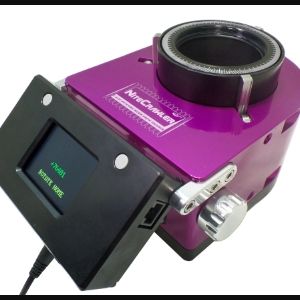
MoonLite’s NiteCrawler models are a fully electronic focuser that uses fly by wire control technology for very accurate positioning in both focus and rotation. The patented design is intended for remote automation of large heavy imaging instruments providing extreme position accuracy that is repeatable down to .26 Microns. You can control the focuser absolute & relative position, in addition to the rotator position and angle and auxiliary focuser, if one is attached. All motors are fully controllable from within the driver.
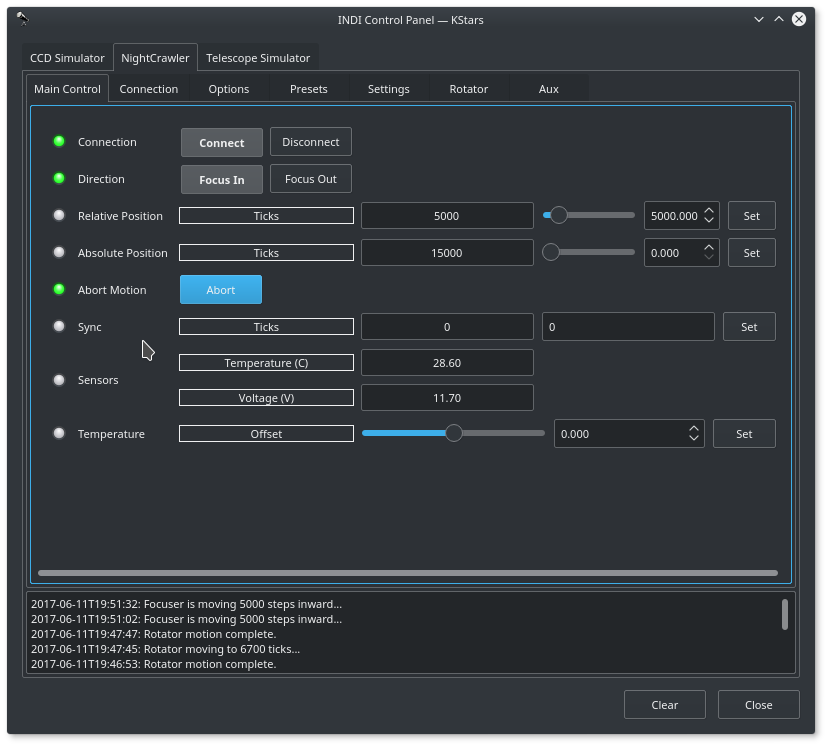
NightCrawler Control Panel

Main Control Tab

  • Direction: Focus IN or Focus OUT. IN decreases ticks count, OUT increases ticks count.
  • Relative Position: Set the number of steps from the current absolute position to move.
  • Absolute Position: Set the number of absolute steps.
  • Sync: Set the current focus position as the entered position.
  • Temperature & Voltage: read out of the built in temperature sensor or the external temperature probe.

Presets

You may set pre-defined presets for common focuser positions in the Presets tab.

  • Preset Positions: You may set up to 3 preset positions. When you make a change, the new values will be saved in the driver's configuration file and are loaded automatically in subsequent uses.
  • Preset GOTO: Click any preset to go to that position

Operation

The INDI NightCrawer driver provides complete functionality for all the features supported by MoonLite including relative and absolute positioning, temperature readout, rotator control, auxiliary control, preset and configuration parameters.
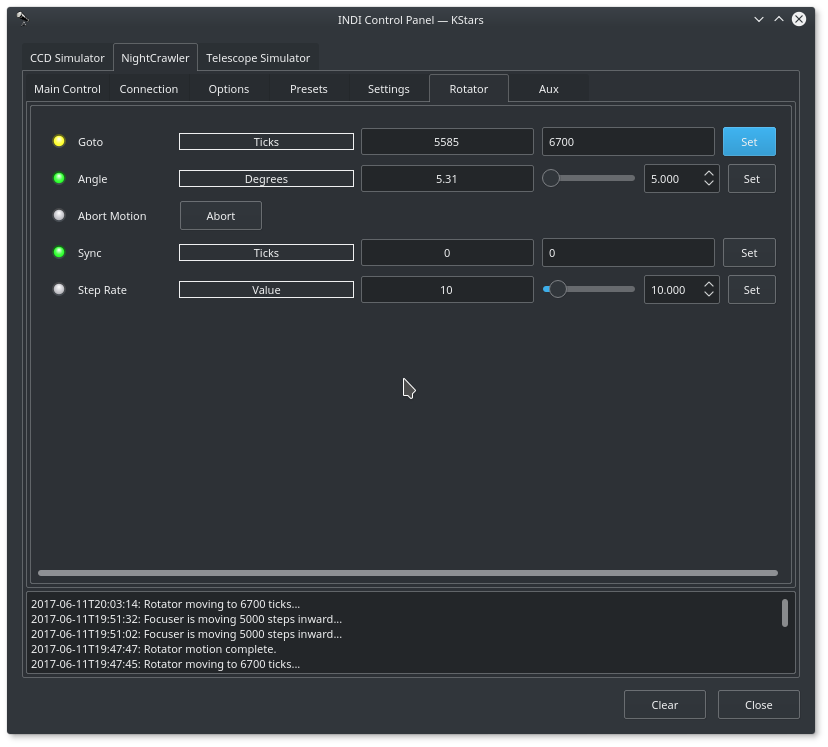
NightCrawler Rotator

Rotator Control

The rotator position can be controlled via either setting the absolute ticks count or angle. To change the current absolute position to a new position without moving the rotator, use Sync to set the new desired position. Once Sync is set, the current absolute position shall report the synced ticks. Depending on your specific NightCrawler model, each has specific maximum steps (ticks):

  • WR25 374,920 steps per revolution
  • WR30 444,080 steps per revolution
  • WR35 505,960 steps per revolution

NightCrawler Settings

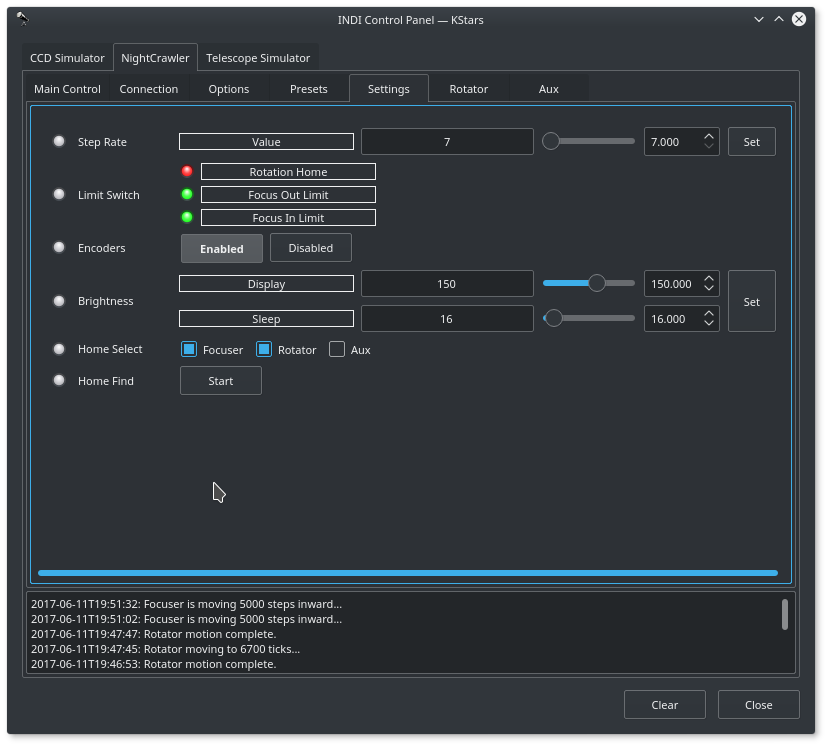
Limit Switches

Limit switches indicate when you close to the limit to motors range of motion. When the limit switch state is Green, then the motor is not close to the limit switch, and when it turns Red, then it is close to the switch limit:

  • Rotator Home: Switch actuated when rotator is close to the home position.
  • Focus Out Limit: Switch actuated when focuser is nearly fully extended out.
  • Focus In Limit: Switch actuated when focuser is nearly fully retracted.

Homing

Nightcrawler supports homing the focuser, rotator, and auxiliary axis in the Settings tab. To select which axis to home, check the desired axes in the Home Select property. Once done, click Start to initiate the process. Homing returns all motors to their zero home position. Depending on the current position of the rotator and focuser, it might take up to 10 minutes before such process is complete. While homing is active, you cannot issue any commands and must wait until the process is over.
Rating
0 vote
Favoured:
0
  • 109.jpg

Listing Details

Website
focuser.com
Driver Name
Nightcrawler
Driver Executable
indi_nightcrawler_focus
Family
Focusers
Manufacturer
MoonLite
Platforms
Linux, MacOS, BSD
Author
Jasem Mutlaq
Version
1.0
Submit reviewPrintVisit
Reviews (0)

Be the first to review this listing!

« Previous listing in Rotators | Next listing in Rotators »
logo

© 2017-2026 by Ikarus Technologies. All rights reserved.

About

FAQ Buy Terms of Service Privacy Policy

Follow Us!

Facebook X Instagram Youtube Discord

Support

Downloads Manuals Warranty Support
  • Home
  • Products
    • Feature Tour
    • StellarMate OS
      • For Raspberry PIFor Raspberry PI
      • For Mini PCFor Mini PC
      • Bundle (Raspberry PI + Mini PCs)Bundle (Raspberry PI + Mini PCs)
    • StellarMate X Controller
    • StellarMate Pro 128GB
    • StellarMate Pro 64GB
    • Professional Services
    • Ekos Live
    • Distributors
      • USAUSA
      • Canada (Astronomy Plus)Canada (Astronomy Plus)
      • Canada (Telescope Canada)Canada (Telescope Canada)
      • Canada (Ontario Telescope)Canada (Ontario Telescope)
      • United Kingdom (First Light Optics)United Kingdom (First Light Optics)
      • United Kingdom (Dark Clear Skies)United Kingdom (Dark Clear Skies)
      • United Kingdom (365 Astronomy)United Kingdom (365 Astronomy)
      • EuropeEurope
      • SwitzerlandSwitzerland
      • ChinaChina
      • JapanJapan
      • Australia (Bintel)Australia (Bintel)
      • Australia (Optics Central)Australia (Optics Central)
    • View Cart
  • Downloads
    • StellarMateOS
    • Ekos
    • Mobile App
    • StellarMate Tools
    • Documentation
  • Devices
    • Adaptive Optics
    • Auxiliary
    • Cameras
    • Dust Caps
    • Light Box
    • Domes
    • Filter Wheels
    • Focusers
    • Mounts
    • Rotators
    • Observatory Controllers
    • Weather Stations
  • Support
    • First Time Setup
      • StellarMate X
      • StellarMate Pro
      • StellarMate OS
    • Manual
    • Ekos
      • Setup
      • Analyze
      • Capture
      • Focus
      • Guide
      • Align
      • Polar Alignment
      • Scheduler
      • Observatory
      • Mount
        • Mount
        • Meridian Flip
    • FAQ
      • StellarMate
      • StellarMate Pro
      • StellarMate X
      • StellarMate App
      • Mounts
      • Cameras
      • Focusers
      • EkosLive
      • Scheduler
      • Calibration
    • Tutorials
      • Web Manager
      • VNC Viewer
      • GPS Dongles
      • Beta Releases
      • Powered USB Hubs
      • Remote Support
      • Direct Ethernet
      • Ekos Debugger
      • Connecting Bluetooth Mounts
      • Backup Restore
      • Telescopius Mosaic Import
    • Ekos Live
    • Account
    • Submit Ticket
    • View Tickets
    • Survey