
Login

Log in

Forgot Username or Password ?
New Here? Create an account
StellarMate
  • Home
  • Products
    • Feature Tour
    • StellarMate OS
      • For Raspberry PIFor Raspberry PI
      • For Mini PCFor Mini PC
      • Bundle (Raspberry PI + Mini PCs)Bundle (Raspberry PI + Mini PCs)
    • StellarMate X Controller
    • StellarMate Pro 128GB
    • StellarMate Pro 64GB
    • Professional Services
    • Ekos Live
    • Distributors
      • USAUSA
      • Canada (Astronomy Plus)Canada (Astronomy Plus)
      • Canada (Telescope Canada)Canada (Telescope Canada)
      • Canada (Ontario Telescope)Canada (Ontario Telescope)
      • United Kingdom (First Light Optics)United Kingdom (First Light Optics)
      • United Kingdom (Dark Clear Skies)United Kingdom (Dark Clear Skies)
      • United Kingdom (365 Astronomy)United Kingdom (365 Astronomy)
      • EuropeEurope
      • SwitzerlandSwitzerland
      • ChinaChina
      • JapanJapan
      • Australia (Bintel)Australia (Bintel)
      • Australia (Optics Central)Australia (Optics Central)
    • View Cart
  • Downloads
    • StellarMateOS
    • Ekos
    • Mobile App
    • StellarMate Tools
    • Documentation
  • Devices
    • Adaptive Optics
    • Auxiliary
    • Cameras
    • Dust Caps
    • Light Box
    • Domes
    • Filter Wheels
    • Focusers
    • Mounts
    • Rotators
    • Observatory Controllers
    • Weather Stations
  • Support
    • First Time Setup
      • StellarMate X
      • StellarMate Pro
      • StellarMate OS
    • Manual
    • Ekos
      • Setup
      • Analyze
      • Capture
      • Focus
      • Guide
      • Align
      • Polar Alignment
      • Scheduler
      • Observatory
      • Mount
        • Mount
        • Meridian Flip
    • FAQ
      • StellarMate
      • StellarMate Pro
      • StellarMate X
      • StellarMate App
      • Mounts
      • Cameras
      • Focusers
      • EkosLive
      • Scheduler
      • Calibration
    • Tutorials
      • Web Manager
      • VNC Viewer
      • GPS Dongles
      • Beta Releases
      • Powered USB Hubs
      • Remote Support
      • Direct Ethernet
      • Ekos Debugger
      • Connecting Bluetooth Mounts
      • Backup Restore
      • Telescopius Mosaic Import
    • Ekos Live
    • Account
    • Submit Ticket
    • View Tickets
    • Survey

SkySafari

Features

This driver is no longer needed when using SkySafari 7 or later. Connect to INDI server directly and do not add this driver to your equipment profile. Only use this driver when using SkySafari 6 or earilar

SkySafari is an astronomy application for Mac, iOS, and Android. Using either SkySafari Pro or Plus versions, you can control yours mounts. Since SkySafari currently does not support INDI mounts directly, a middleware drivers was develop to sit between SkySafari and INDI mount. It would allow you to use SkySafari to control and monitor your mount while at the same time use other INDI clients like Ekos to control it.

Current features are:

  • Goto
  • Align
  • Slew Speeds
  • Abort
  • Setting of Latitude/Longitude

Operation

Add the auxiliary SkySafari driver to your equipment profile. The driver is available under the auxiliary dropdown in Ekos.
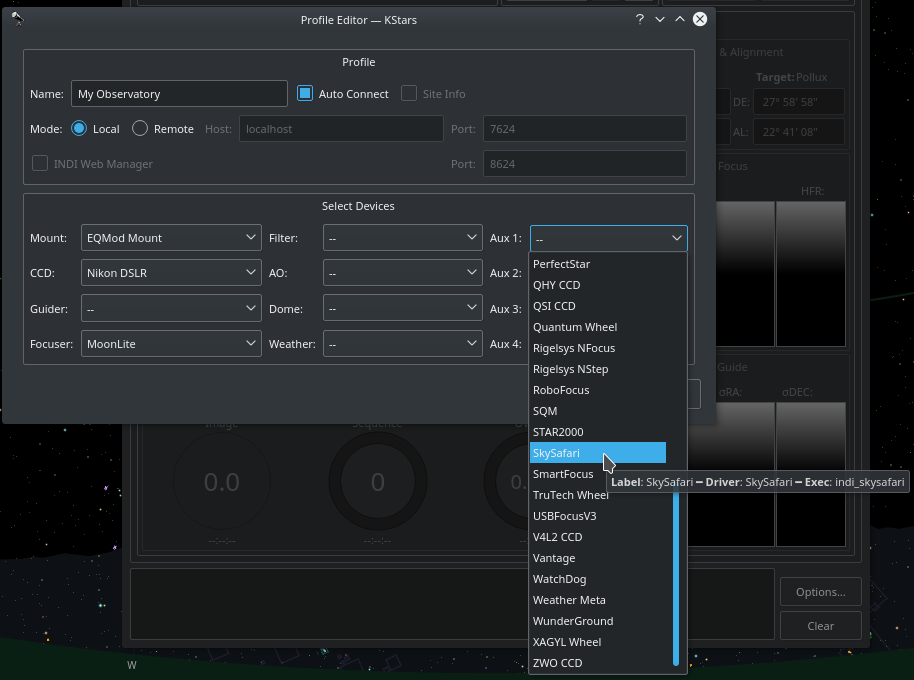
SkySafari in Ekos


When you start the profile, you only need to update what mount the SkySafari drivers listens to. By default, it is set to Telescope Simulator. In the example below, since the mount we selected in our example Equipment Profile is EQMod, we change the mount to EQMod Mount.

EQMod Mount is just an example, select the mount driver suitable for your mount in the Equipment Profile.

You must do this before you click connect and establish the server. If you are already connected, click Disconnect, update the mount name, then click Connect again.
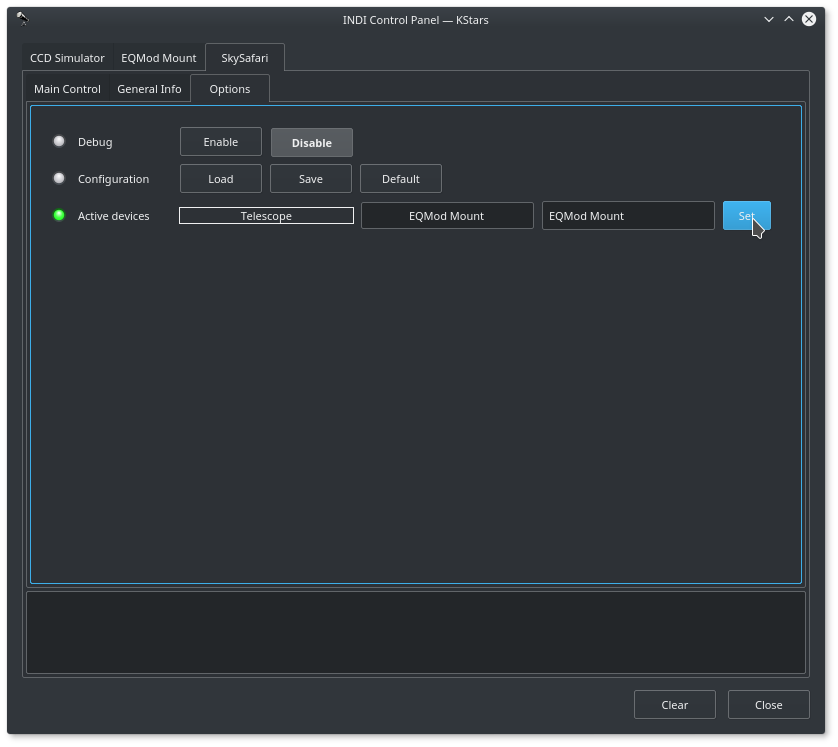
SkySafari Options


After you change the mount name to your active mount, please save the configuration by clicking Save so that your mount name is used the next time you connect to the driver.

In the unlikely event your INDI mount is NOT running on the same machine as the SkySafari INDI driver, you can change the INDI server hostname and port. Otherwise, leave this settings without any changes. By default, the SkySafari INDI server is started on port 9624. You can change this value if necessary but it is recommended to leave it as it

Now are you ready to connect, simply connect all your drivers and the SkySafari driver shall establish a server that your iOS/Android SkySafari app can connect to. When everything is OK, you shall see a message indicating that server is established:
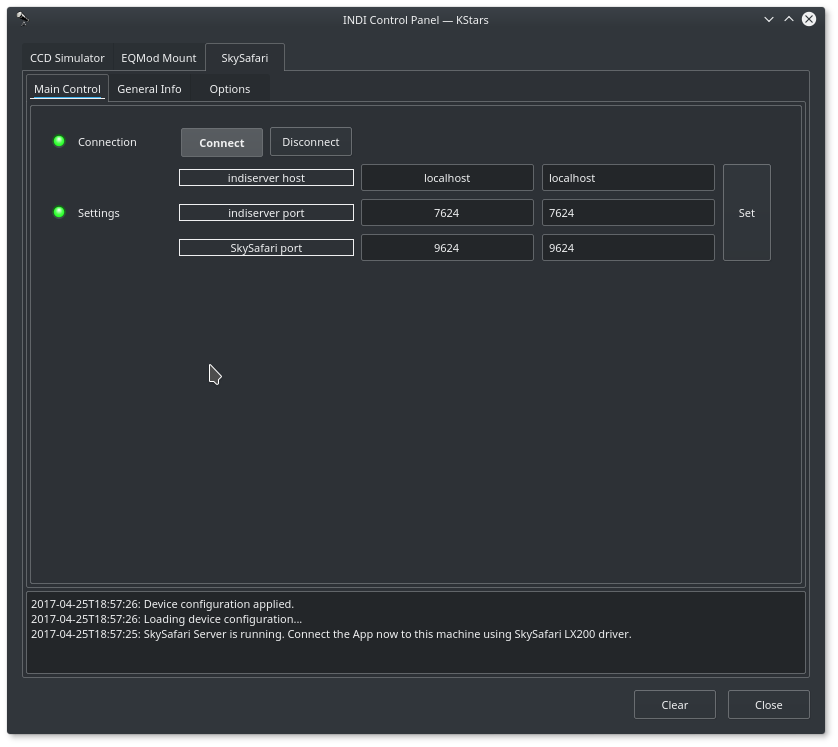
SkySafari Server Online


Now open your SkySafari app and setup your mount. By default, the INDI SkySafari servers starts on port 9624. You need to know the IP address of the machine running INDI server, whether it's a desktop machine or embedded like Raspberry PI.

If you are connecting to StellarMate directly over HotSpot mode, enter 10.250.250.1 as the IP address in SkySafari. If StellarMate is joined to home WiFi network, enter stellarmate.local or StellarMate IP address directly.

Go the mount setup page in your App and set the IP address and port of the INDI SkySafari server:
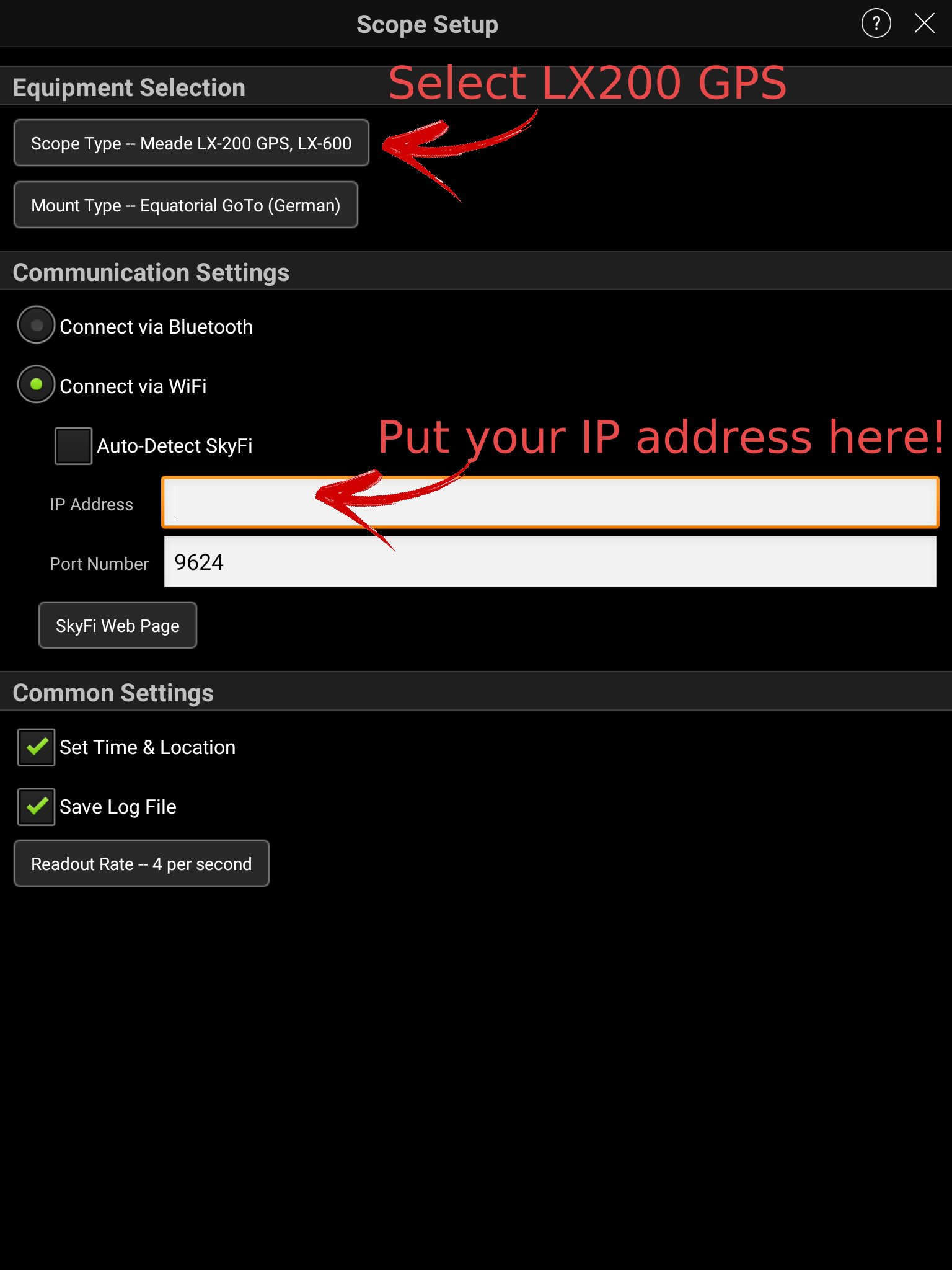
SkySafari Mount Settings


You're set! Now simply connect to the telescope by clicking the telescope icon in SkySafari and it should connect in a few seconds if there are no issues in communication. Then you can control your mount as your would normally would under SkySafari while at the same being able to use it at the same time in any INDI compatible client.
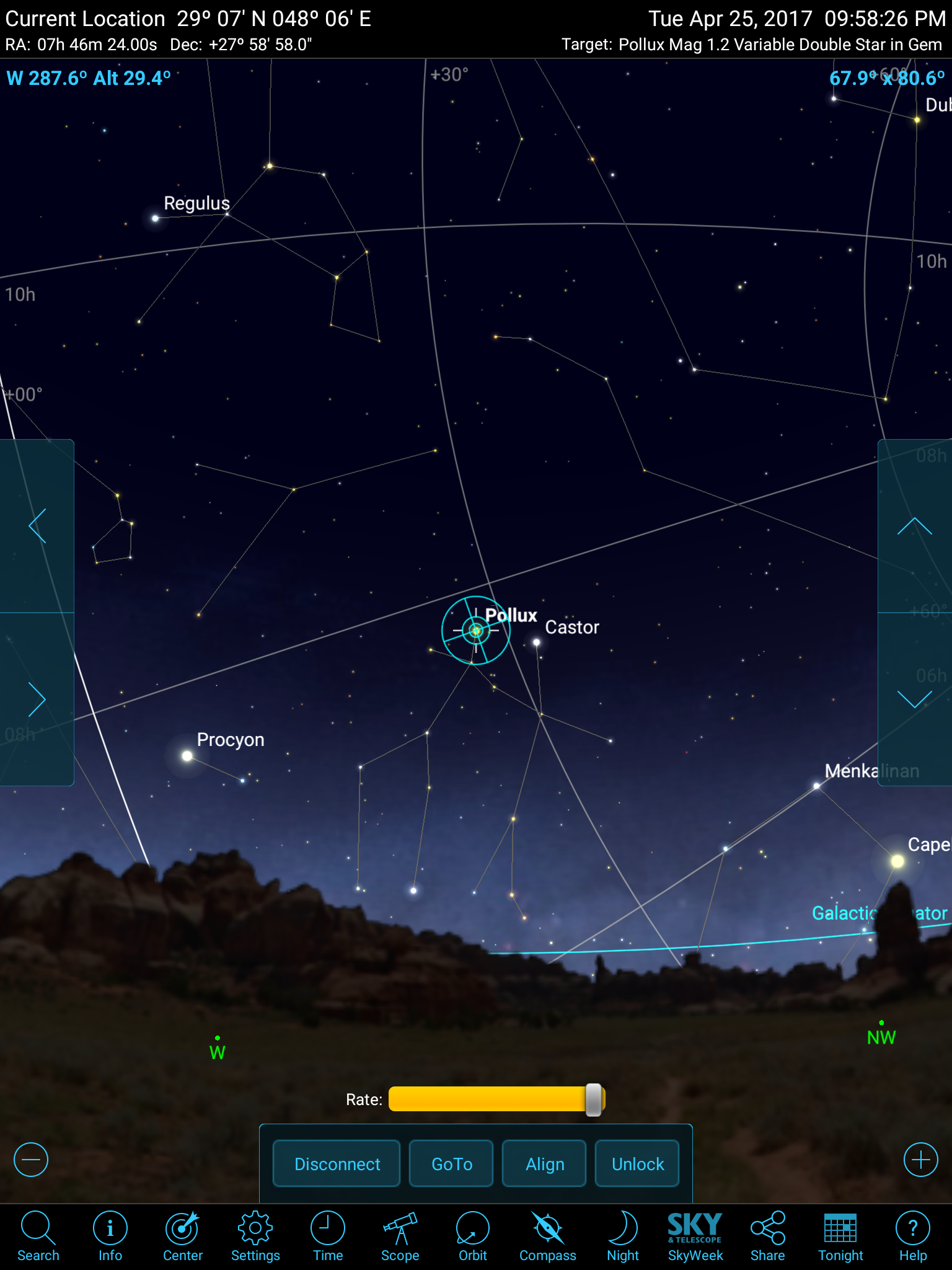
SkySafari Mount Online
Rating
0 vote
Favoured:
0
  • 147.jpg

Listing Details

Website
skysafariastronomy.com
Driver Name
SkySafari
Driver Executable
indi_skysafari
Family
Auxiliary
Manufacturer
Simulation Curriculum
Platforms
Linux, BSD, Mac
Author
Jasem Mutlaq
Version
0.1
Submit reviewPrintVisit
Reviews (0)

Be the first to review this listing!

« Previous listing in Mounts | Next listing in Mounts »
logo

© 2017-2025 by Ikarus Technologies. All rights reserved.

About

FAQ Buy Terms of Service Privacy Policy

Support

Downloads Manuals Warranty Support

Follow Us!

Facebook Twitter Instagram Youtube
  • Home
  • Products
    • Feature Tour
    • StellarMate OS
      • For Raspberry PIFor Raspberry PI
      • For Mini PCFor Mini PC
      • Bundle (Raspberry PI + Mini PCs)Bundle (Raspberry PI + Mini PCs)
    • StellarMate X Controller
    • StellarMate Pro 128GB
    • StellarMate Pro 64GB
    • Professional Services
    • Ekos Live
    • Distributors
      • USAUSA
      • Canada (Astronomy Plus)Canada (Astronomy Plus)
      • Canada (Telescope Canada)Canada (Telescope Canada)
      • Canada (Ontario Telescope)Canada (Ontario Telescope)
      • United Kingdom (First Light Optics)United Kingdom (First Light Optics)
      • United Kingdom (Dark Clear Skies)United Kingdom (Dark Clear Skies)
      • United Kingdom (365 Astronomy)United Kingdom (365 Astronomy)
      • EuropeEurope
      • SwitzerlandSwitzerland
      • ChinaChina
      • JapanJapan
      • Australia (Bintel)Australia (Bintel)
      • Australia (Optics Central)Australia (Optics Central)
    • View Cart
  • Downloads
    • StellarMateOS
    • Ekos
    • Mobile App
    • StellarMate Tools
    • Documentation
  • Devices
    • Adaptive Optics
    • Auxiliary
    • Cameras
    • Dust Caps
    • Light Box
    • Domes
    • Filter Wheels
    • Focusers
    • Mounts
    • Rotators
    • Observatory Controllers
    • Weather Stations
  • Support
    • First Time Setup
      • StellarMate X
      • StellarMate Pro
      • StellarMate OS
    • Manual
    • Ekos
      • Setup
      • Analyze
      • Capture
      • Focus
      • Guide
      • Align
      • Polar Alignment
      • Scheduler
      • Observatory
      • Mount
        • Mount
        • Meridian Flip
    • FAQ
      • StellarMate
      • StellarMate Pro
      • StellarMate X
      • StellarMate App
      • Mounts
      • Cameras
      • Focusers
      • EkosLive
      • Scheduler
      • Calibration
    • Tutorials
      • Web Manager
      • VNC Viewer
      • GPS Dongles
      • Beta Releases
      • Powered USB Hubs
      • Remote Support
      • Direct Ethernet
      • Ekos Debugger
      • Connecting Bluetooth Mounts
      • Backup Restore
      • Telescopius Mosaic Import
    • Ekos Live
    • Account
    • Submit Ticket
    • View Tickets
    • Survey