
Login

Log in

Forgot Username or Password ?
New Here? Create an account
StellarMate
  • Home
  • Products
    • Feature Tour
    • StellarMate OS
      • For Raspberry PIFor Raspberry PI
      • For Mini PCFor Mini PC
      • Bundle (Raspberry PI + Mini PCs)Bundle (Raspberry PI + Mini PCs)
    • StellarMate X Controller
    • StellarMate Pro 128GB
    • StellarMate Pro 64GB
    • Professional Services
    • Ekos Live
    • Distributors
      • USAUSA
      • Canada (Astronomy Plus)Canada (Astronomy Plus)
      • Canada (Telescope Canada)Canada (Telescope Canada)
      • Canada (Ontario Telescope)Canada (Ontario Telescope)
      • United Kingdom (First Light Optics)United Kingdom (First Light Optics)
      • United Kingdom (Dark Clear Skies)United Kingdom (Dark Clear Skies)
      • United Kingdom (365 Astronomy)United Kingdom (365 Astronomy)
      • EuropeEurope
      • SwitzerlandSwitzerland
      • ChinaChina
      • JapanJapan
      • Australia (Bintel)Australia (Bintel)
      • Australia (Optics Central)Australia (Optics Central)
    • View Cart
  • Downloads
    • StellarMateOS
    • Ekos
    • Mobile App
    • StellarMate Tools
    • Documentation
  • Devices
    • Adaptive Optics
    • Auxiliary
    • Cameras
    • Dust Caps
    • Light Box
    • Domes
    • Filter Wheels
    • Focusers
    • Mounts
    • Rotators
    • Observatory Controllers
    • Weather Stations
  • Support
    • First Time Setup
      • StellarMate X
      • StellarMate Pro
      • StellarMate OS
    • Manual
    • Ekos
      • Setup
      • Analyze
      • Capture
      • Focus
      • Guide
      • Align
      • Polar Alignment
      • Scheduler
      • Observatory
      • Mount
        • Mount
        • Meridian Flip
    • FAQ
      • StellarMate
      • StellarMate Pro
      • StellarMate X
      • StellarMate App
      • Mounts
      • Cameras
      • Focusers
      • EkosLive
      • Scheduler
      • Calibration
    • Tutorials
      • Web Manager
      • VNC Viewer
      • GPS Dongles
      • Beta Releases
      • Powered USB Hubs
      • Remote Support
      • Direct Ethernet
      • Ekos Debugger
      • Connecting Bluetooth Mounts
      • Backup Restore
      • Telescopius Mosaic Import
    • Ekos Live
    • Account
    • Submit Ticket
    • View Tickets
    • Survey

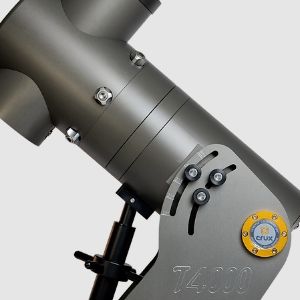
HOBYM / CRUX Mounts & TitanTCS

This driver is connected to INDI Library through USB, RS-232, Bluetooth or WiFi.


The Crux TitanTCS driver is released as part of the INDI Library.

The minimum firmware requirement to use with INDI Library is version 3.2.0 or higher.


The current features are:

   Slew, Abort, Park, Pulse guide, Latitude/Longitude setting, Date & Time setting


Make sure you have selected the appropriate communication port on the Connections tab before connecting to the mount.

You can choose from the available auto-sensing ports (e.g. /dev/ttyUSB0, /dev/ACM0, /dev/ACM1) or enter the port manually.


The communication speed of RS-232 uses 115,200 BPS unless the user has changed it.


By default, the mount assumes the weight is always below the telescope.

Be sure to sync with the telescope above the weight.

For safety reasons, Goto can only be used after synced.
 

Rating
0 vote
Favoured:
0
  • 132.jpg

Listing Details

Website
www.hobym.net
Tags
HOBYM, CRUX, CRUX140, CRUX200HD, TitanTCS
Driver Name
CRUX TitanTCS
Driver Executable
indi_crux_mount
Family
Telescope
Manufacturer
HOBYM Observatory
Platforms
Linux, BSD
Author
Suyoung Park
Version
1.0
Submit reviewPrintVisit
Reviews (0)

Be the first to review this listing!

« Previous listing in Mounts | Next listing in Mounts »
logo

© 2017-2025 by Ikarus Technologies. All rights reserved.

About

FAQ Buy Terms of Service Privacy Policy

Support

Downloads Manuals Warranty Support

Follow Us!

Facebook Twitter Instagram Youtube
  • Home
  • Products
    • Feature Tour
    • StellarMate OS
      • For Raspberry PIFor Raspberry PI
      • For Mini PCFor Mini PC
      • Bundle (Raspberry PI + Mini PCs)Bundle (Raspberry PI + Mini PCs)
    • StellarMate X Controller
    • StellarMate Pro 128GB
    • StellarMate Pro 64GB
    • Professional Services
    • Ekos Live
    • Distributors
      • USAUSA
      • Canada (Astronomy Plus)Canada (Astronomy Plus)
      • Canada (Telescope Canada)Canada (Telescope Canada)
      • Canada (Ontario Telescope)Canada (Ontario Telescope)
      • United Kingdom (First Light Optics)United Kingdom (First Light Optics)
      • United Kingdom (Dark Clear Skies)United Kingdom (Dark Clear Skies)
      • United Kingdom (365 Astronomy)United Kingdom (365 Astronomy)
      • EuropeEurope
      • SwitzerlandSwitzerland
      • ChinaChina
      • JapanJapan
      • Australia (Bintel)Australia (Bintel)
      • Australia (Optics Central)Australia (Optics Central)
    • View Cart
  • Downloads
    • StellarMateOS
    • Ekos
    • Mobile App
    • StellarMate Tools
    • Documentation
  • Devices
    • Adaptive Optics
    • Auxiliary
    • Cameras
    • Dust Caps
    • Light Box
    • Domes
    • Filter Wheels
    • Focusers
    • Mounts
    • Rotators
    • Observatory Controllers
    • Weather Stations
  • Support
    • First Time Setup
      • StellarMate X
      • StellarMate Pro
      • StellarMate OS
    • Manual
    • Ekos
      • Setup
      • Analyze
      • Capture
      • Focus
      • Guide
      • Align
      • Polar Alignment
      • Scheduler
      • Observatory
      • Mount
        • Mount
        • Meridian Flip
    • FAQ
      • StellarMate
      • StellarMate Pro
      • StellarMate X
      • StellarMate App
      • Mounts
      • Cameras
      • Focusers
      • EkosLive
      • Scheduler
      • Calibration
    • Tutorials
      • Web Manager
      • VNC Viewer
      • GPS Dongles
      • Beta Releases
      • Powered USB Hubs
      • Remote Support
      • Direct Ethernet
      • Ekos Debugger
      • Connecting Bluetooth Mounts
      • Backup Restore
      • Telescopius Mosaic Import
    • Ekos Live
    • Account
    • Submit Ticket
    • View Tickets
    • Survey