Login

Log in

Forgot Username or Password ?
New Here? Create an account
StellarMate
  • Home
  • Products
    • Feature Tour
    • StellarMate OS
      • For Raspberry PIFor Raspberry PI
      • For Mini PCFor Mini PC
      • Bundle (Raspberry PI + Mini PCs)Bundle (Raspberry PI + Mini PCs)
    • StellarMate X Controller
    • StellarMate Pro 128GB
    • StellarMate Pro 64GB
    • Professional Services
    • Ekos Live
    • Distributors
      • USAUSA
      • Canada (Astronomy Plus)Canada (Astronomy Plus)
      • Canada (Telescope Canada)Canada (Telescope Canada)
      • Canada (Ontario Telescope)Canada (Ontario Telescope)
      • United Kingdom (First Light Optics)United Kingdom (First Light Optics)
      • United Kingdom (Dark Clear Skies)United Kingdom (Dark Clear Skies)
      • United Kingdom (365 Astronomy)United Kingdom (365 Astronomy)
      • EuropeEurope
      • SwitzerlandSwitzerland
      • ChinaChina
      • JapanJapan
      • Australia (Bintel)Australia (Bintel)
      • Australia (Optics Central)Australia (Optics Central)
    • View Cart
  • Downloads
    • StellarMateOS
    • Ekos
    • Mobile App
    • StellarMate Tools
    • Documentation
  • Devices
    • Adaptive Optics
    • Auxiliary
    • Cameras
    • Dust Caps
    • Light Box
    • Domes
    • Filter Wheels
    • Focusers
    • Mounts
    • Rotators
    • Observatory Controllers
    • Weather Stations
  • Support
    • First Time Setup
      • StellarMate X
      • StellarMate Pro
      • StellarMate OS
    • Manual
    • Ekos
      • Setup
      • Analyze
      • Capture
      • Focus
      • Guide
      • Align
      • Polar Alignment
      • Scheduler
      • Observatory
      • Mount
        • Mount
        • Meridian Flip
    • FAQ
      • StellarMate
      • StellarMate Pro
      • StellarMate X
      • StellarMate App
      • Mounts
      • Cameras
      • Focusers
      • EkosLive
      • Scheduler
      • Calibration
    • Tutorials
      • Web Manager
      • VNC Viewer
      • GPS Dongles
      • Beta Releases
      • Powered USB Hubs
      • Remote Support
      • Direct Ethernet
      • Ekos Debugger
      • Connecting Bluetooth Mounts
      • Backup Restore
      • Telescopius Mosaic Import
    • Ekos Live
    • Account
    • Submit Ticket
    • View Tickets
    • Survey

AstroLink 4

Features

Astrolink4 INDI driver supports AstroLink 4 mini device. AstroLink 4.0 mini device was designed to make astroimaging easier. Contains two focuser controllers, regulated outputs for heaters, peltiers or fans, switchable power outputs, different sensors inputs, hand controller connector and many other options. Following funcitons are supported in INDI driver:

  • 1x stepper focuser motor output
  • 1x DC focuser motor output
  • 3x switchable 12V power outputs
  • 2x regulated PWM outputs
  • temperature / humidity / dew point readings
  • voltage, current, consumed energy monitoring
connection

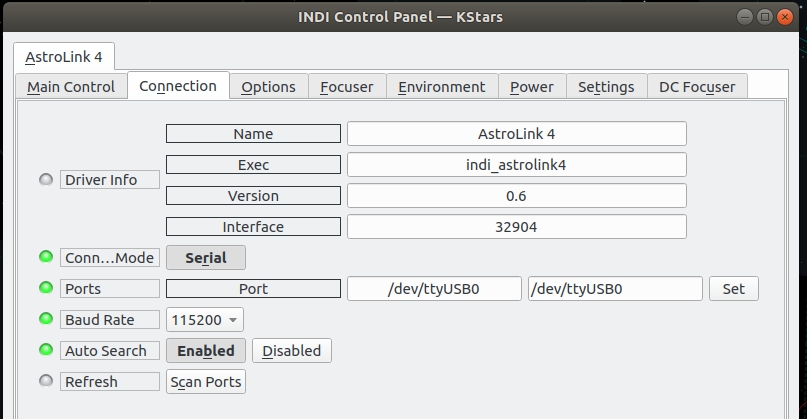
Before establishing connection, go to Connection tab and select the port. Once connected, you can:

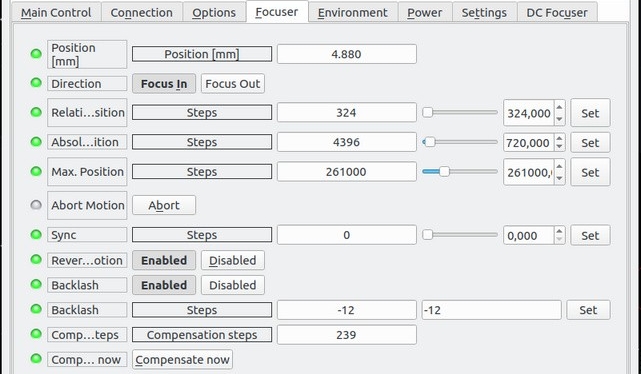
  • Move the focuser to a position relative to the current one - select "focus in" or "focus out" and specify the number of steps in the "relative position"
  • Move to an absolute position - just specify the step number.
  • Sync, that is, set a specific number as the current position of the motor.
  • Abort the focuser motion at any time.
  • Power
  • Environment (weather readings)
  • DC Focuser

Focuser

focuser

Set the absolute or relative position of the focuser, control backlash and temperature compensation.

Environment
environment

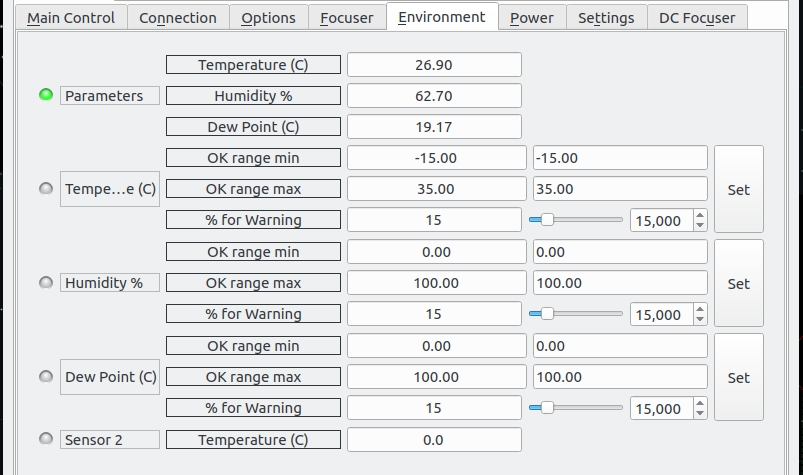
The environment group provides readings for the temperature, humidity, and dew point. Below them are the limit settings for each parameter that includes the minimum and maximum OK range for each reading along with the percentage when the reading is marked as warning. If the reading exceed the OK limit, it shall be marked as ALERT. If a Critical property is marked as ALERT, then it marks the complete observatory as unsafe and the client software might take precuations to protect the observatory such as automatic parking of mount and/or dome.

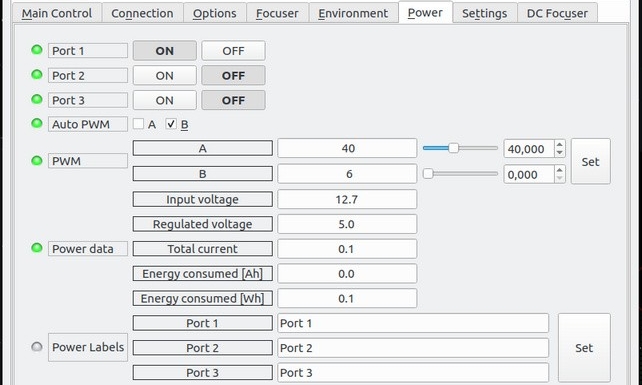
Power
power

Control the DC output ports and PWM output. Consolidated power data is displayed below the control.

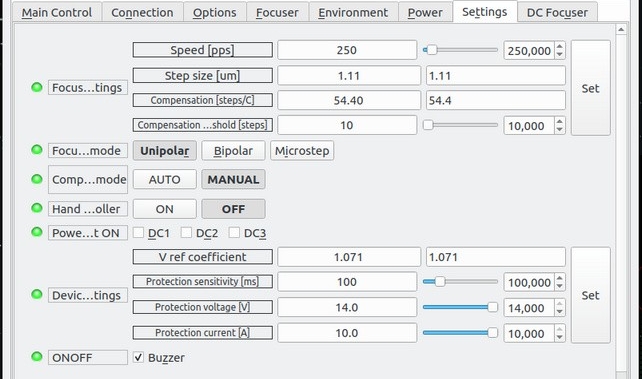
Settings
settings

Set the controller param

Rating
0 vote
Favoured:
0
  • 139.jpg

Listing Details

Website
shop.astrojolo.com/product/astrolink-4-usb/
Driver Name
AstroLink 4
Driver Executable
indi_astrolink4
Family
Auxiliary
Manufacturer
AstroJolo
Platforms
Linux, BSD, MacOS
Author
Ɓukasz Socha
Version
0.1
Submit reviewPrintVisit
Reviews (0)

Be the first to review this listing!

« Previous listing in Focusers | Next listing in Focusers »
logo

© 2017-2026 by Ikarus Technologies. All rights reserved.

About

FAQ Buy Terms of Service Privacy Policy

Follow Us!

Facebook X Instagram Youtube Discord

Support

Downloads Manuals Warranty Support
  • Home
  • Products
    • Feature Tour
    • StellarMate OS
      • For Raspberry PIFor Raspberry PI
      • For Mini PCFor Mini PC
      • Bundle (Raspberry PI + Mini PCs)Bundle (Raspberry PI + Mini PCs)
    • StellarMate X Controller
    • StellarMate Pro 128GB
    • StellarMate Pro 64GB
    • Professional Services
    • Ekos Live
    • Distributors
      • USAUSA
      • Canada (Astronomy Plus)Canada (Astronomy Plus)
      • Canada (Telescope Canada)Canada (Telescope Canada)
      • Canada (Ontario Telescope)Canada (Ontario Telescope)
      • United Kingdom (First Light Optics)United Kingdom (First Light Optics)
      • United Kingdom (Dark Clear Skies)United Kingdom (Dark Clear Skies)
      • United Kingdom (365 Astronomy)United Kingdom (365 Astronomy)
      • EuropeEurope
      • SwitzerlandSwitzerland
      • ChinaChina
      • JapanJapan
      • Australia (Bintel)Australia (Bintel)
      • Australia (Optics Central)Australia (Optics Central)
    • View Cart
  • Downloads
    • StellarMateOS
    • Ekos
    • Mobile App
    • StellarMate Tools
    • Documentation
  • Devices
    • Adaptive Optics
    • Auxiliary
    • Cameras
    • Dust Caps
    • Light Box
    • Domes
    • Filter Wheels
    • Focusers
    • Mounts
    • Rotators
    • Observatory Controllers
    • Weather Stations
  • Support
    • First Time Setup
      • StellarMate X
      • StellarMate Pro
      • StellarMate OS
    • Manual
    • Ekos
      • Setup
      • Analyze
      • Capture
      • Focus
      • Guide
      • Align
      • Polar Alignment
      • Scheduler
      • Observatory
      • Mount
        • Mount
        • Meridian Flip
    • FAQ
      • StellarMate
      • StellarMate Pro
      • StellarMate X
      • StellarMate App
      • Mounts
      • Cameras
      • Focusers
      • EkosLive
      • Scheduler
      • Calibration
    • Tutorials
      • Web Manager
      • VNC Viewer
      • GPS Dongles
      • Beta Releases
      • Powered USB Hubs
      • Remote Support
      • Direct Ethernet
      • Ekos Debugger
      • Connecting Bluetooth Mounts
      • Backup Restore
      • Telescopius Mosaic Import
    • Ekos Live
    • Account
    • Submit Ticket
    • View Tickets
    • Survey