
Login

Log in

Forgot Username or Password ?
New Here? Create an account
StellarMate
  • Home
  • Products
    • Feature Tour
    • StellarMate OS
      • For Raspberry PIFor Raspberry PI
      • For Mini PCFor Mini PC
      • Bundle (Raspberry PI + Mini PCs)Bundle (Raspberry PI + Mini PCs)
    • StellarMate X Controller
    • StellarMate Pro 128GB
    • StellarMate Pro 64GB
    • Professional Services
    • Ekos Live
    • Distributors
      • USAUSA
      • Canada (Astronomy Plus)Canada (Astronomy Plus)
      • Canada (Telescope Canada)Canada (Telescope Canada)
      • Canada (Ontario Telescope)Canada (Ontario Telescope)
      • United Kingdom (First Light Optics)United Kingdom (First Light Optics)
      • United Kingdom (Dark Clear Skies)United Kingdom (Dark Clear Skies)
      • United Kingdom (365 Astronomy)United Kingdom (365 Astronomy)
      • EuropeEurope
      • SwitzerlandSwitzerland
      • ChinaChina
      • JapanJapan
      • Australia (Bintel)Australia (Bintel)
      • Australia (Optics Central)Australia (Optics Central)
    • View Cart
  • Downloads
    • StellarMateOS
    • Ekos
    • Mobile App
    • StellarMate Tools
    • Documentation
  • Devices
    • Adaptive Optics
    • Auxiliary
    • Cameras
    • Dust Caps
    • Light Box
    • Domes
    • Filter Wheels
    • Focusers
    • Mounts
    • Rotators
    • Observatory Controllers
    • Weather Stations
  • Support
    • First Time Setup
      • StellarMate X
      • StellarMate Pro
      • StellarMate OS
    • Manual
    • Ekos
      • Setup
      • Analyze
      • Capture
      • Focus
      • Guide
      • Align
      • Polar Alignment
      • Scheduler
      • Observatory
      • Mount
        • Mount
        • Meridian Flip
    • FAQ
      • StellarMate
      • StellarMate Pro
      • StellarMate X
      • StellarMate App
      • Mounts
      • Cameras
      • Focusers
      • EkosLive
      • Scheduler
      • Calibration
    • Tutorials
      • Web Manager
      • VNC Viewer
      • GPS Dongles
      • Beta Releases
      • Powered USB Hubs
      • Remote Support
      • Direct Ethernet
      • Ekos Debugger
      • Connecting Bluetooth Mounts
      • Backup Restore
      • Telescopius Mosaic Import
    • Ekos Live
    • Account
    • Submit Ticket
    • View Tickets
    • Survey

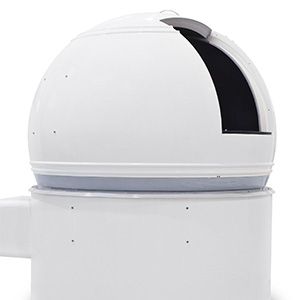
ScopeDome

ScopeDome controller can be used with a classic observatory dome and also roll-off roof, but the driver has only been tested with a dome so far.

Features

ScopeDome is a fully automatic observatory dome control system. It also has a variety of sensors and relays to control power to other devices. Link your dome to a computer for complete automation including telescope slaving and shutter control. It supports the following features:

  1. Slave dome rotation to your telescope
  2. Rotation-only and full shutter-and-rotation systems available.
  3. Direct confirmation of shutter open/closed state.
  4. Safety interlocks automatically close dome upon loss of data from PC.
  5. Park-before-close option to avoid mechanical interferences.
  6. Manual override controls for shutter and rotation control
  7. Field-upgradable firmware

The driver supports USB Card controller version 2.1 and since driver version 2.0 (included in INDI 1.9.1) also the new Arduino cards and has been tested with firmware versions 3.52 and 3.70 for USB Card and versions 5.4 and 5.7 for Arduino card. Currently the driver does have function to calibrate steps per revolution of the dome, but it is strongly recommended to generate an inertia table which has to be done with the Windows driver setup software and copy it to ~/.indi/ScopeDome_DomeInertia_Table.txt

Operation

Before connecting you should select the card type, either USB Card 2.1 or Arduino card. If connecting via USB the baud rate needs to be set to 115200 for USB Card and 9600 for Arduino card. Network connection is supported for Arduino card only. Once you are connected to the dome, you can move it in absolute or relative position. You can slave the dome to the mount by setting the required slaving parameters:

  1. Radius is for the radius of the dome in meters.
  2. Shutter width is the clearance of the shutter of the dome in meters
  3. N displacement is for North displacement. If telescope is not in its ideal central position this parameter allows to configure how much it is displaced from the center. Displacement to north are positive, and to south are negative.
  4. E displacement is for East displacement. Similar as the above, displacement to east are positive, and to west are negative.
  5. Up displacement is for displacement in the vertical axis. Up is positive, down is negative.
  6. OTA offset is for the distance of the optical axis to the crossing point of RA and DEC. In fork mount this is generally 0, but for German like mounts is the distance from mount axis cross to the center line of the telescope. West is positive, east is negative.

After settings the parameters above, go to Options tab and click Save in Configurations so that the parameters are used in future sessions. You can also set the Autosync threshold which is the minimum distance autosync will move the dome. Any motion below this threshold will not be triggered. This is to prevent continuous dome moving during telescope tracking.
Rating
0 vote
Favoured:
0
  • 98.jpg

Listing Details

Website
www.scopedome.com
Driver Name
ScopeDome
Driver Executable
indi_scopedome_dome
Family
Domes
Manufacturer
ScopeDome
Platforms
Linux, MacOS X, Raspberry PI
Author
Jarno Paananen
Version
2.0
Submit reviewPrintVisit
Reviews (0)

Be the first to review this listing!

« Previous listing in Domes | Next listing in Domes »
logo

© 2017-2025 by Ikarus Technologies. All rights reserved.

About

FAQ Buy Terms of Service Privacy Policy

Support

Downloads Manuals Warranty Support

Follow Us!

Facebook Twitter Instagram Youtube
  • Home
  • Products
    • Feature Tour
    • StellarMate OS
      • For Raspberry PIFor Raspberry PI
      • For Mini PCFor Mini PC
      • Bundle (Raspberry PI + Mini PCs)Bundle (Raspberry PI + Mini PCs)
    • StellarMate X Controller
    • StellarMate Pro 128GB
    • StellarMate Pro 64GB
    • Professional Services
    • Ekos Live
    • Distributors
      • USAUSA
      • Canada (Astronomy Plus)Canada (Astronomy Plus)
      • Canada (Telescope Canada)Canada (Telescope Canada)
      • Canada (Ontario Telescope)Canada (Ontario Telescope)
      • United Kingdom (First Light Optics)United Kingdom (First Light Optics)
      • United Kingdom (Dark Clear Skies)United Kingdom (Dark Clear Skies)
      • United Kingdom (365 Astronomy)United Kingdom (365 Astronomy)
      • EuropeEurope
      • SwitzerlandSwitzerland
      • ChinaChina
      • JapanJapan
      • Australia (Bintel)Australia (Bintel)
      • Australia (Optics Central)Australia (Optics Central)
    • View Cart
  • Downloads
    • StellarMateOS
    • Ekos
    • Mobile App
    • StellarMate Tools
    • Documentation
  • Devices
    • Adaptive Optics
    • Auxiliary
    • Cameras
    • Dust Caps
    • Light Box
    • Domes
    • Filter Wheels
    • Focusers
    • Mounts
    • Rotators
    • Observatory Controllers
    • Weather Stations
  • Support
    • First Time Setup
      • StellarMate X
      • StellarMate Pro
      • StellarMate OS
    • Manual
    • Ekos
      • Setup
      • Analyze
      • Capture
      • Focus
      • Guide
      • Align
      • Polar Alignment
      • Scheduler
      • Observatory
      • Mount
        • Mount
        • Meridian Flip
    • FAQ
      • StellarMate
      • StellarMate Pro
      • StellarMate X
      • StellarMate App
      • Mounts
      • Cameras
      • Focusers
      • EkosLive
      • Scheduler
      • Calibration
    • Tutorials
      • Web Manager
      • VNC Viewer
      • GPS Dongles
      • Beta Releases
      • Powered USB Hubs
      • Remote Support
      • Direct Ethernet
      • Ekos Debugger
      • Connecting Bluetooth Mounts
      • Backup Restore
      • Telescopius Mosaic Import
    • Ekos Live
    • Account
    • Submit Ticket
    • View Tickets
    • Survey