
Login

Log in

Forgot Username or Password ?
New Here? Create an account
StellarMate
  • Home
  • Products
    • Feature Tour
    • StellarMate OS
      • For Raspberry PIFor Raspberry PI
      • For Mini PCFor Mini PC
      • Bundle (Raspberry PI + Mini PCs)Bundle (Raspberry PI + Mini PCs)
    • StellarMate X Controller
    • StellarMate Pro 128GB
    • StellarMate Pro 64GB
    • Professional Services
    • Ekos Live
    • Distributors
      • USAUSA
      • Canada (Astronomy Plus)Canada (Astronomy Plus)
      • Canada (Telescope Canada)Canada (Telescope Canada)
      • Canada (Ontario Telescope)Canada (Ontario Telescope)
      • United Kingdom (First Light Optics)United Kingdom (First Light Optics)
      • United Kingdom (Dark Clear Skies)United Kingdom (Dark Clear Skies)
      • United Kingdom (365 Astronomy)United Kingdom (365 Astronomy)
      • EuropeEurope
      • SwitzerlandSwitzerland
      • ChinaChina
      • JapanJapan
      • Australia (Bintel)Australia (Bintel)
      • Australia (Optics Central)Australia (Optics Central)
    • View Cart
  • Downloads
    • StellarMateOS
    • Ekos
    • Mobile App
    • StellarMate Tools
    • Documentation
  • Devices
    • Adaptive Optics
    • Auxiliary
    • Cameras
    • Dust Caps
    • Light Box
    • Domes
    • Filter Wheels
    • Focusers
    • Mounts
    • Rotators
    • Observatory Controllers
    • Weather Stations
  • Support
    • First Time Setup
      • StellarMate X
      • StellarMate Pro
      • StellarMate OS
    • Manual
    • Ekos
      • Setup
      • Analyze
      • Capture
      • Focus
      • Guide
      • Align
      • Polar Alignment
      • Scheduler
      • Observatory
      • Mount
        • Mount
        • Meridian Flip
    • FAQ
      • StellarMate
      • StellarMate Pro
      • StellarMate X
      • StellarMate App
      • Mounts
      • Cameras
      • Focusers
      • EkosLive
      • Scheduler
      • Calibration
    • Tutorials
      • Web Manager
      • VNC Viewer
      • GPS Dongles
      • Beta Releases
      • Powered USB Hubs
      • Remote Support
      • Direct Ethernet
      • Ekos Debugger
      • Connecting Bluetooth Mounts
      • Backup Restore
      • Telescopius Mosaic Import
    • Ekos Live
    • Account
    • Submit Ticket
    • View Tickets
    • Survey

Universal Roll Off Driver

Features

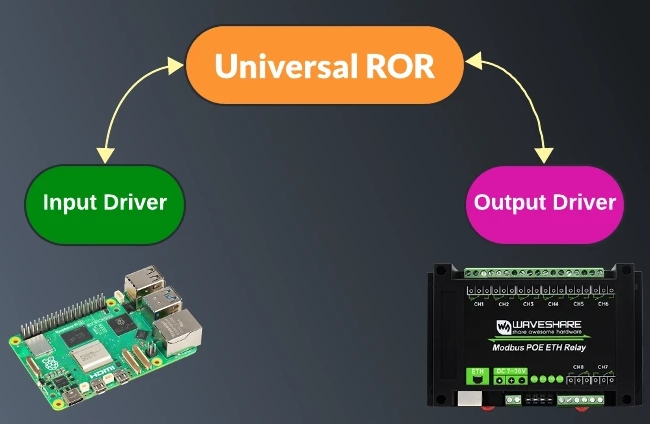
With the release of INDI v2.0.9, a new INDI Universal Roll-Off Roof (ROR) driver was introduced. Up to this point, there was no standanrd implementation for a simple ROR in INDI. Depending on you control your roof, you had to write your own INDI driver to control it in INDI. To facilitate ROR control in INDI, the new Universal ROR driver relies on two additional drivers interfaces:

  • 1. INDI::InputInterface: This interface is used for drivers that want to report digital and analog inputs. It's a standarized way to report these readings. Standard properties are DIGITAL_INPUT_N (Starting from 1) and ANALOG_INPUT_N
  • 2. INDI::OutputInterface: Used for drivers to trigger digital outputs (e.g. Relays and GPIOs). Standard properties are DIGITAL_OUTPUT_N

Using the interfaces above, INDI v2.0.9 introduced a few compatible drivers. We intend to support more observatory-class controllers, relays, and input sensors with upcoming releases:

1. GPIO driver: Uses libgpiod so it can work on multiple boards and not just raspberry pi. Driver utilizes both Input and Output interfaces. Currently driver only controls pins labeled as GPIO by the kernel. 
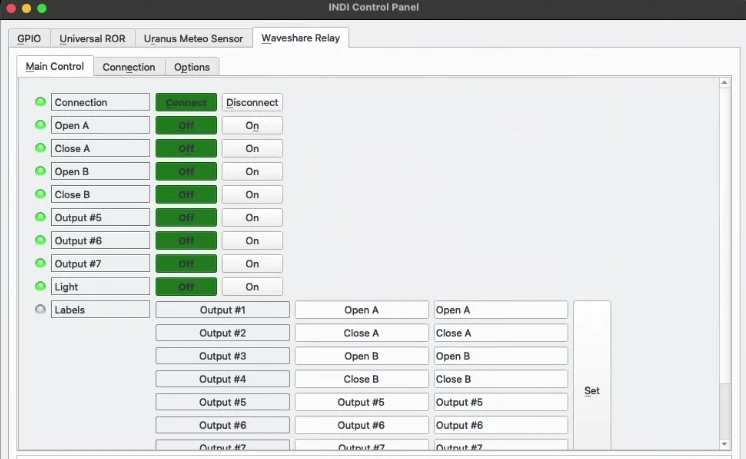
2. Waveshare Relay driver: Controls relays on 8-ch Ethernet Relay Module. Driver utilizes Output interface.

3. Luantico Dragon Controller driver: An observatory-class controller that supports both Input and Output interfaces. 
chart

Operation

To use the new Universal ROR driver with your own roll-off roof, you need the following:

  • 1. Output: A command to open and close the roof motors. This is usually accomplished with relays.
  • 2. Input: Fully opened and Fully closed sensors. Normally, mechanical or magnetic limit switches are used to cut the power off to the motors once the roof reaches either the fully opened (Unparked) or fully closed (Parked) states.
  • The digital inputs can be read as GPIO on a board like Raspberry or Orange PI or a dedicated observatory controller.

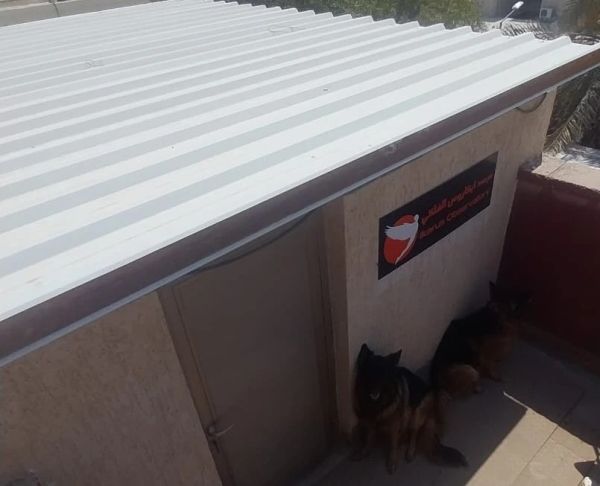
For my home observatory, two relays are used to opening the roof, and two more to close it. For input sensors, I used 1-Channel AC 220V Optocoupler Module to detect whether the fully closed and opened limit switches are actuated or not. This module is connected to Raspberry PI GPIO, which is running StellarMate OS running both the INDI GPIO, Waveshare Relay, and Universal ROR drivers.

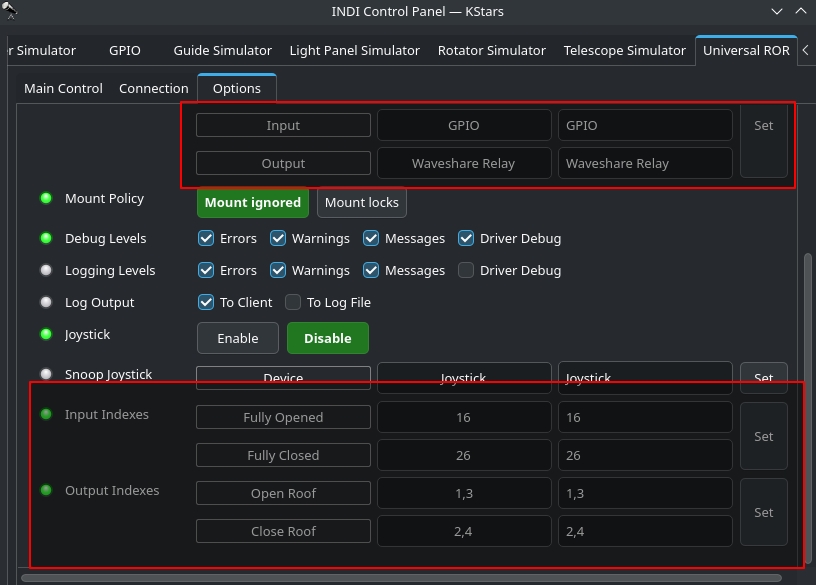
Finally, the ROR driver can be configured to monitor for the INPUT and OUTPUT drivers. In my case, INPUT driver is INDI GPIO, and OUTPUT driver is Waveshare Relay. Next, you specify which digital input our outputs indexes are used for each.
 

options

Do not confuse this with GPIO numbering, you specify the DIGTAL_INPUT index as reported in the driver. For a single input/output, you simply put the index. For multiple coils, you add a comma-separated list. All the input and output labels can be customized.
connections

Rating
0 vote
Favoured:
0
  • 232.jpg

Listing Details

Tags
DIY, ROR
Driver Name
Universal Roll Off Driver
Driver Executable
indi_universalror_roof
Family
Domes
Manufacturer
DIY
Models
DIY
Platforms
Linux, MacOS, BSD
Author
Jasem Mutlaq
Version
0.1
Submit reviewPrint
Reviews (0)

Be the first to review this listing!

« Previous listing in Domes | Next listing in Domes »
logo

© 2017-2025 by Ikarus Technologies. All rights reserved.

About

FAQ Buy Terms of Service Privacy Policy

Support

Downloads Manuals Warranty Support

Follow Us!

Facebook Twitter Instagram Youtube
  • Home
  • Products
    • Feature Tour
    • StellarMate OS
      • For Raspberry PIFor Raspberry PI
      • For Mini PCFor Mini PC
      • Bundle (Raspberry PI + Mini PCs)Bundle (Raspberry PI + Mini PCs)
    • StellarMate X Controller
    • StellarMate Pro 128GB
    • StellarMate Pro 64GB
    • Professional Services
    • Ekos Live
    • Distributors
      • USAUSA
      • Canada (Astronomy Plus)Canada (Astronomy Plus)
      • Canada (Telescope Canada)Canada (Telescope Canada)
      • Canada (Ontario Telescope)Canada (Ontario Telescope)
      • United Kingdom (First Light Optics)United Kingdom (First Light Optics)
      • United Kingdom (Dark Clear Skies)United Kingdom (Dark Clear Skies)
      • United Kingdom (365 Astronomy)United Kingdom (365 Astronomy)
      • EuropeEurope
      • SwitzerlandSwitzerland
      • ChinaChina
      • JapanJapan
      • Australia (Bintel)Australia (Bintel)
      • Australia (Optics Central)Australia (Optics Central)
    • View Cart
  • Downloads
    • StellarMateOS
    • Ekos
    • Mobile App
    • StellarMate Tools
    • Documentation
  • Devices
    • Adaptive Optics
    • Auxiliary
    • Cameras
    • Dust Caps
    • Light Box
    • Domes
    • Filter Wheels
    • Focusers
    • Mounts
    • Rotators
    • Observatory Controllers
    • Weather Stations
  • Support
    • First Time Setup
      • StellarMate X
      • StellarMate Pro
      • StellarMate OS
    • Manual
    • Ekos
      • Setup
      • Analyze
      • Capture
      • Focus
      • Guide
      • Align
      • Polar Alignment
      • Scheduler
      • Observatory
      • Mount
        • Mount
        • Meridian Flip
    • FAQ
      • StellarMate
      • StellarMate Pro
      • StellarMate X
      • StellarMate App
      • Mounts
      • Cameras
      • Focusers
      • EkosLive
      • Scheduler
      • Calibration
    • Tutorials
      • Web Manager
      • VNC Viewer
      • GPS Dongles
      • Beta Releases
      • Powered USB Hubs
      • Remote Support
      • Direct Ethernet
      • Ekos Debugger
      • Connecting Bluetooth Mounts
      • Backup Restore
      • Telescopius Mosaic Import
    • Ekos Live
    • Account
    • Submit Ticket
    • View Tickets
    • Survey