
Login

Log in

Forgot Username or Password ?
New Here? Create an account
StellarMate
  • Home
  • Products
    • Feature Tour
    • StellarMate OS
      • For Raspberry PIFor Raspberry PI
      • For Mini PCFor Mini PC
      • Bundle (Raspberry PI + Mini PCs)Bundle (Raspberry PI + Mini PCs)
    • StellarMate X Controller
    • StellarMate Pro 128GB
    • StellarMate Pro 64GB
    • Professional Services
    • Ekos Live
    • Distributors
      • USAUSA
      • Canada (Astronomy Plus)Canada (Astronomy Plus)
      • Canada (Telescope Canada)Canada (Telescope Canada)
      • Canada (Ontario Telescope)Canada (Ontario Telescope)
      • United Kingdom (First Light Optics)United Kingdom (First Light Optics)
      • United Kingdom (Dark Clear Skies)United Kingdom (Dark Clear Skies)
      • United Kingdom (365 Astronomy)United Kingdom (365 Astronomy)
      • EuropeEurope
      • SwitzerlandSwitzerland
      • ChinaChina
      • JapanJapan
      • Australia (Bintel)Australia (Bintel)
      • Australia (Optics Central)Australia (Optics Central)
    • View Cart
  • Downloads
    • StellarMateOS
    • Ekos
    • Mobile App
    • StellarMate Tools
    • Documentation
  • Devices
    • Adaptive Optics
    • Auxiliary
    • Cameras
    • Controllers
    • Cover & Light Sources
    • Domes
    • Filter Wheels
    • Focusers
    • Mounts
      • Astrophysics
      • Celestron
      • Meade
      • Omegon
      • Orion
      • SkyWatcher
      • IOptron
      • Vixen
    • Rotators
    • Spectrographs
    • Weather Stations
  • Support
    • First Time Setup
      • StellarMate X
      • StellarMate Pro
      • StellarMate OS
    • Manual
    • Ekos
      • Setup
      • Analyze
      • Capture
      • Focus
      • Guide
      • Align
      • Polar Alignment
      • Scheduler
      • Observatory
      • Mount
        • Mount
        • Meridian Flip
    • FAQ
      • StellarMate
      • StellarMate Pro
      • StellarMate X
      • StellarMate App
      • Mounts
      • Cameras
      • Focusers
      • EkosLive
      • Scheduler
      • Calibration
    • Tutorials
      • Web Manager
      • VNC Viewer
      • GPS Dongles
      • Beta Releases
      • Powered USB Hubs
      • Remote Support
      • Direct Ethernet
      • Ekos Debugger
      • Connecting Bluetooth Mounts
      • Backup Restore
      • Telescopius Mosaic Import
    • Ekos Live
    • Account
    • Submit Ticket
    • View Tickets
    • Survey
  1. Home /
  2. Devices /
  3. Controllers /
  4. Joysticks

Joysticks

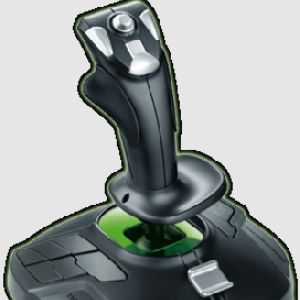
INDI (v >= 0.9.7) supports game pads under Linux for input control. The INDI joystick driver (indi_joystick) queries the controller and provide the following properties:

  • Joysticks: Each joystick displays a normalized magnitude [0 to 1] and an angle. The angle is measured counter clock wise starting from the right/east direction [0 to 360]. They are defined as JOYSTICK_# where # is the joystick number.
  • Axes: Each joystick has two or more axes. Each axis has a raw value and angle. The raw value ranges from -32767.0 to 32767.0 They are defined as AXIS_# where # is the axis number.
  • Buttons: Buttons are either on or off. They are defined as BUTTON_# where # is the button number.

To snoop on buttons, call IDSnoopDevice("Joystick", "JOYSTICK_BUTTONS") from your driver.

Currently, INDI EQMod and all LX200 based driver support joystick input for basic motion control, slew speed selection...etc. In order to use the joystick, you need to run the telescope & joystick drivers simultaneously. For example:

$ indiserver indi_lx200gps indi_joystick


Alternatively, if you running from KStars, simply select your telescope driver and the joystick driver (found under auxiliary category) before you click Start Service.

Once you connect your telescope, you may then enable the joystick input in your Options tab. Then a new tab Joystick will be created where you can map your telescope functions to joystick input. You can check which controls on your game pad correspond to INDI standard property names by checking the Monitor tab in your joystick driver. For example, below is a screenshot showing JOYSTICK_1, in addition to AXIS_1 and AXIS_2 as being active. Those are the names you can set in the Joystick tab in your telescope driver.

INDI Control Panel

Rating
0 vote
Favoured:
0
  • 76.jpg

Listing Details

Driver Name
Joystick
Driver Executable
indi_joystick
Family
Auxiliary
Manufacturer
N/A
Platforms
Linux
Author
Jasem Mutlaq
Version
0.1
Submit reviewPrint
Reviews (0)

Be the first to review this listing!

« Previous listing in Controllers | Next listing in Controllers »
logo

© 2017-2025 by Ikarus Technologies. All rights reserved.

About

FAQ Buy Terms of Service Privacy Policy

Support

Downloads Manuals Warranty Support

Follow Us!

Facebook Twitter Instagram Youtube
  • Home
  • Products
    • Feature Tour
    • StellarMate OS
      • For Raspberry PIFor Raspberry PI
      • For Mini PCFor Mini PC
      • Bundle (Raspberry PI + Mini PCs)Bundle (Raspberry PI + Mini PCs)
    • StellarMate X Controller
    • StellarMate Pro 128GB
    • StellarMate Pro 64GB
    • Professional Services
    • Ekos Live
    • Distributors
      • USAUSA
      • Canada (Astronomy Plus)Canada (Astronomy Plus)
      • Canada (Telescope Canada)Canada (Telescope Canada)
      • Canada (Ontario Telescope)Canada (Ontario Telescope)
      • United Kingdom (First Light Optics)United Kingdom (First Light Optics)
      • United Kingdom (Dark Clear Skies)United Kingdom (Dark Clear Skies)
      • United Kingdom (365 Astronomy)United Kingdom (365 Astronomy)
      • EuropeEurope
      • SwitzerlandSwitzerland
      • ChinaChina
      • JapanJapan
      • Australia (Bintel)Australia (Bintel)
      • Australia (Optics Central)Australia (Optics Central)
    • View Cart
  • Downloads
    • StellarMateOS
    • Ekos
    • Mobile App
    • StellarMate Tools
    • Documentation
  • Devices
    • Adaptive Optics
    • Auxiliary
    • Cameras
    • Controllers
    • Cover & Light Sources
    • Domes
    • Filter Wheels
    • Focusers
    • Mounts
      • Astrophysics
      • Celestron
      • Meade
      • Omegon
      • Orion
      • SkyWatcher
      • IOptron
      • Vixen
    • Rotators
    • Spectrographs
    • Weather Stations
  • Support
    • First Time Setup
      • StellarMate X
      • StellarMate Pro
      • StellarMate OS
    • Manual
    • Ekos
      • Setup
      • Analyze
      • Capture
      • Focus
      • Guide
      • Align
      • Polar Alignment
      • Scheduler
      • Observatory
      • Mount
        • Mount
        • Meridian Flip
    • FAQ
      • StellarMate
      • StellarMate Pro
      • StellarMate X
      • StellarMate App
      • Mounts
      • Cameras
      • Focusers
      • EkosLive
      • Scheduler
      • Calibration
    • Tutorials
      • Web Manager
      • VNC Viewer
      • GPS Dongles
      • Beta Releases
      • Powered USB Hubs
      • Remote Support
      • Direct Ethernet
      • Ekos Debugger
      • Connecting Bluetooth Mounts
      • Backup Restore
      • Telescopius Mosaic Import
    • Ekos Live
    • Account
    • Submit Ticket
    • View Tickets
    • Survey