
Login

Log in

Forgot Username or Password ?
New Here? Create an account
StellarMate
  • Home
  • Products
    • Feature Tour
    • StellarMate OS
      • For Raspberry PIFor Raspberry PI
      • For Mini PCFor Mini PC
      • Bundle (Raspberry PI + Mini PCs)Bundle (Raspberry PI + Mini PCs)
    • StellarMate X Controller
    • StellarMate Pro 128GB
    • StellarMate Pro 64GB
    • Professional Services
    • Ekos Live
    • Distributors
      • USAUSA
      • Canada (Astronomy Plus)Canada (Astronomy Plus)
      • Canada (Telescope Canada)Canada (Telescope Canada)
      • Canada (Ontario Telescope)Canada (Ontario Telescope)
      • United Kingdom (First Light Optics)United Kingdom (First Light Optics)
      • United Kingdom (Dark Clear Skies)United Kingdom (Dark Clear Skies)
      • United Kingdom (365 Astronomy)United Kingdom (365 Astronomy)
      • EuropeEurope
      • SwitzerlandSwitzerland
      • ChinaChina
      • JapanJapan
      • Australia (Bintel)Australia (Bintel)
      • Australia (Optics Central)Australia (Optics Central)
    • View Cart
  • Downloads
    • StellarMateOS
    • Ekos
    • Mobile App
    • StellarMate Tools
    • Documentation
  • Devices
    • Adaptive Optics
    • Auxiliary
    • Cameras
    • Controllers
    • Cover & Light Sources
    • Domes
    • Filter Wheels
    • Focusers
    • Mounts
      • Astrophysics
      • Celestron
      • Meade
      • Omegon
      • Orion
      • SkyWatcher
      • IOptron
      • Vixen
    • Rotators
    • Spectrographs
    • Weather Stations
  • Support
    • First Time Setup
      • StellarMate X
      • StellarMate Pro
      • StellarMate OS
    • Manual
    • Ekos
      • Setup
      • Analyze
      • Capture
      • Focus
      • Guide
      • Align
      • Polar Alignment
      • Scheduler
      • Observatory
      • Mount
        • Mount
        • Meridian Flip
    • FAQ
      • StellarMate
      • StellarMate Pro
      • StellarMate X
      • StellarMate App
      • Mounts
      • Cameras
      • Focusers
      • EkosLive
      • Scheduler
      • Calibration
    • Tutorials
      • Web Manager
      • VNC Viewer
      • GPS Dongles
      • Beta Releases
      • Powered USB Hubs
      • Remote Support
      • Direct Ethernet
      • Ekos Debugger
      • Connecting Bluetooth Mounts
      • Backup Restore
      • Telescopius Mosaic Import
    • Ekos Live
    • Account
    • Submit Ticket
    • View Tickets
    • Survey
  1. Home /
  2. Devices /
  3. Auxiliary /
  4. Deep Sky Dad FP1

Deep Sky Dad FP1

Features

A GPS device is also required. Many devices are support, please check the hardware compatiblity page before purchasing a GPS device and make sure the GPS device is supported under Linux. The U-Plox AG GPS available from Odroid is one example of a comptabile device. Depending on the device, you might need to edit /etc/default/gpsd file and edit the DEVICES= section to add the serial port for your GPS device there (e.g. /dev/ttyACM0).

Make sure GPS is receiving data by running gpsmon

Operation
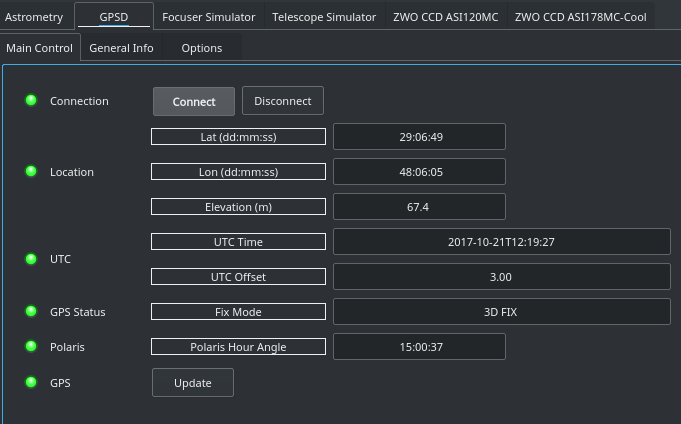
gpsd main controlUpon connection, it should take a few seconds before the GPS fixed is usually obtained. Depending on your client, you might need to configure it to synchronize it with GPS data with the mount and other devices. KStars performs this synchronization automatically without requiring any further action from the user.

What's difference between INDI GPSD (this driver) and INDI GPS NMEA drivers?

INDI GPS NMEA driver fills the gap for people who use mobile phone's gps for setting location and time in KStars/Ekos. indi-gpsd does pretty much the same, however it is based on different approach. Both of the drivers set time and location (over INDI server) to other INDI drivers (e.g. mount) and clients (e.g. KStars), but:

indi-gpsnmea:

  • reads gps data stream from mobile phone's gps
  • requires network connection of the source of gps data stream i.e. phone running app, which enables gps sharing
  • does not set operating system time/date based on gps source
  • it is operating system independent

indi-gpsd:

  • reads gps data stream from gpsd service
  • requires gpsd service is running and properly configured as a systemwide service
  • ntpd service can read from gpsd service to synchronize operating system time/date to gps source
  • it is operating system dependent and can be used on Linux and OS X, but not Windows

There's no conflict between the two - NTP gets time from GPSD to set operating system time/date, not INDI drivers' and clients' time/date.
We can consider merging these drivers at some point in time, but for now you should run either indi-gpsnmea or indi-gpsd. Using both drivers at the same time makes no sense.
Rating
0 vote
Favoured:
0
  • 24.jpg

Listing Details

Website
shop.deepskydad.com/product/wo-redcat-flap-panel-fp1/
Driver Name
DeepSkyDad FP1
Driver Executable
indi_deepskydad_fp1
Family
Auxiliary (Light Box, Dust Cap)
Manufacturer
DeepSkyDad
Platforms
Linux, BSD, MacOS
Author
Pavle Gartner
Version
1.0
Submit reviewPrintVisit
Reviews (0)

Be the first to review this listing!

« Previous listing in Auxiliary | Next listing in Auxiliary »
logo

© 2017-2025 by Ikarus Technologies. All rights reserved.

About

FAQ Buy Terms of Service Privacy Policy

Support

Downloads Manuals Warranty Support

Follow Us!

Facebook Twitter Instagram Youtube
  • Home
  • Products
    • Feature Tour
    • StellarMate OS
      • For Raspberry PIFor Raspberry PI
      • For Mini PCFor Mini PC
      • Bundle (Raspberry PI + Mini PCs)Bundle (Raspberry PI + Mini PCs)
    • StellarMate X Controller
    • StellarMate Pro 128GB
    • StellarMate Pro 64GB
    • Professional Services
    • Ekos Live
    • Distributors
      • USAUSA
      • Canada (Astronomy Plus)Canada (Astronomy Plus)
      • Canada (Telescope Canada)Canada (Telescope Canada)
      • Canada (Ontario Telescope)Canada (Ontario Telescope)
      • United Kingdom (First Light Optics)United Kingdom (First Light Optics)
      • United Kingdom (Dark Clear Skies)United Kingdom (Dark Clear Skies)
      • United Kingdom (365 Astronomy)United Kingdom (365 Astronomy)
      • EuropeEurope
      • SwitzerlandSwitzerland
      • ChinaChina
      • JapanJapan
      • Australia (Bintel)Australia (Bintel)
      • Australia (Optics Central)Australia (Optics Central)
    • View Cart
  • Downloads
    • StellarMateOS
    • Ekos
    • Mobile App
    • StellarMate Tools
    • Documentation
  • Devices
    • Adaptive Optics
    • Auxiliary
    • Cameras
    • Controllers
    • Cover & Light Sources
    • Domes
    • Filter Wheels
    • Focusers
    • Mounts
      • Astrophysics
      • Celestron
      • Meade
      • Omegon
      • Orion
      • SkyWatcher
      • IOptron
      • Vixen
    • Rotators
    • Spectrographs
    • Weather Stations
  • Support
    • First Time Setup
      • StellarMate X
      • StellarMate Pro
      • StellarMate OS
    • Manual
    • Ekos
      • Setup
      • Analyze
      • Capture
      • Focus
      • Guide
      • Align
      • Polar Alignment
      • Scheduler
      • Observatory
      • Mount
        • Mount
        • Meridian Flip
    • FAQ
      • StellarMate
      • StellarMate Pro
      • StellarMate X
      • StellarMate App
      • Mounts
      • Cameras
      • Focusers
      • EkosLive
      • Scheduler
      • Calibration
    • Tutorials
      • Web Manager
      • VNC Viewer
      • GPS Dongles
      • Beta Releases
      • Powered USB Hubs
      • Remote Support
      • Direct Ethernet
      • Ekos Debugger
      • Connecting Bluetooth Mounts
      • Backup Restore
      • Telescopius Mosaic Import
    • Ekos Live
    • Account
    • Submit Ticket
    • View Tickets
    • Survey